Obeya

Open source · runs on your machine

Direct coding agents like an engineering director.

Every task is a card on a canvas. Agents work in the background, each in its own clone or worktree. You decide by voice, from a narrated demo, the way a director decides in a launch review.

A real run on a small app: an idea by voice, an agent at work, its demo, the approval.

Canvas

Space is memory.

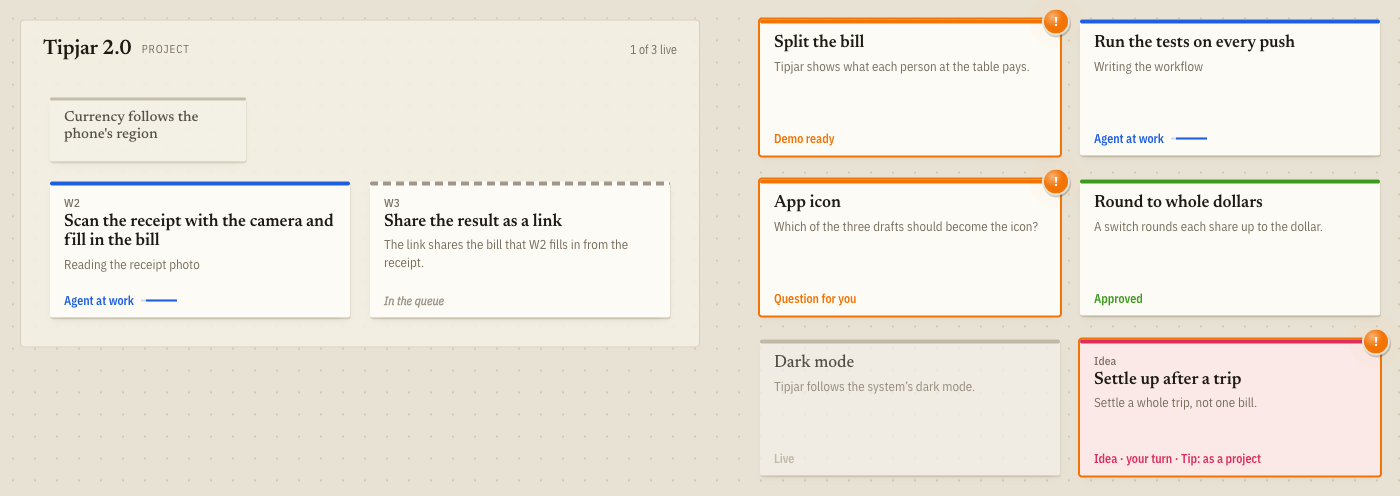
Every task is a card you place where it belongs, and there it stays. Projects hold their workstreams; related work sits together. You know where things are the way you know where things are in a room. The state is a colour, not a column: a card does not move when its agent is done.

  • Agent working
  • Waiting for you
  • Approved
Cards on the canvas in their states
Voice

Push to talk, not terminals.

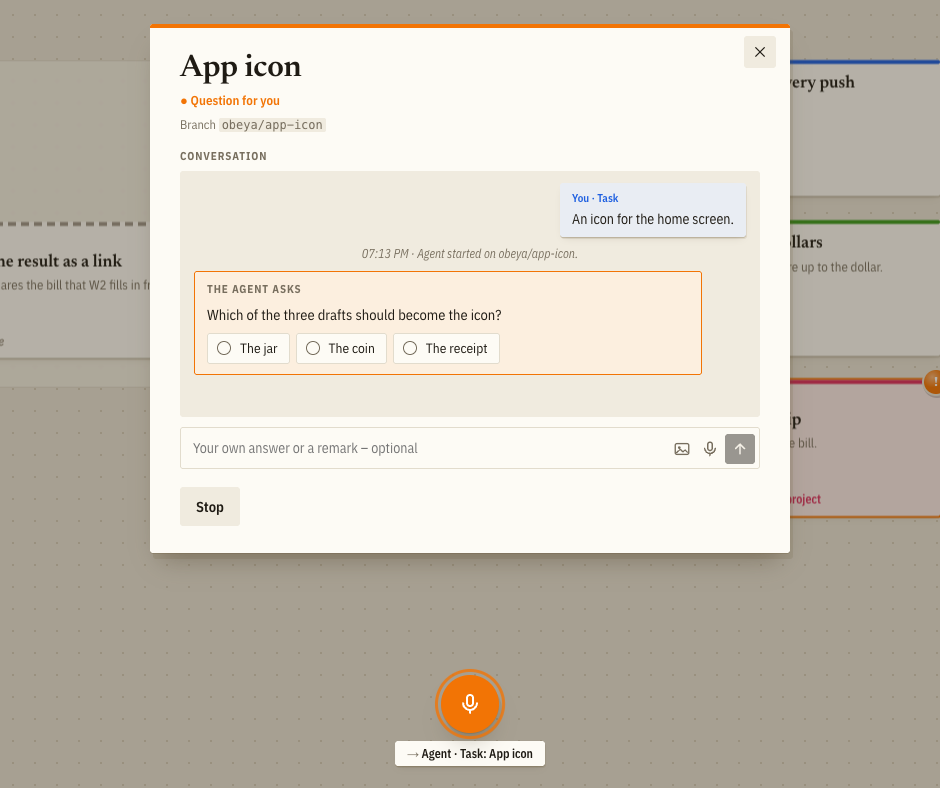
Hold the space bar and say what you want: a new task, an answer to an agent's question, feedback on a demo. Obeya routes it to the card you are looking at. No tabs of terminals to babysit.

An agent's question, answered by holding push-to-talk
Demos

Watch the demo instead of testing it yourself.

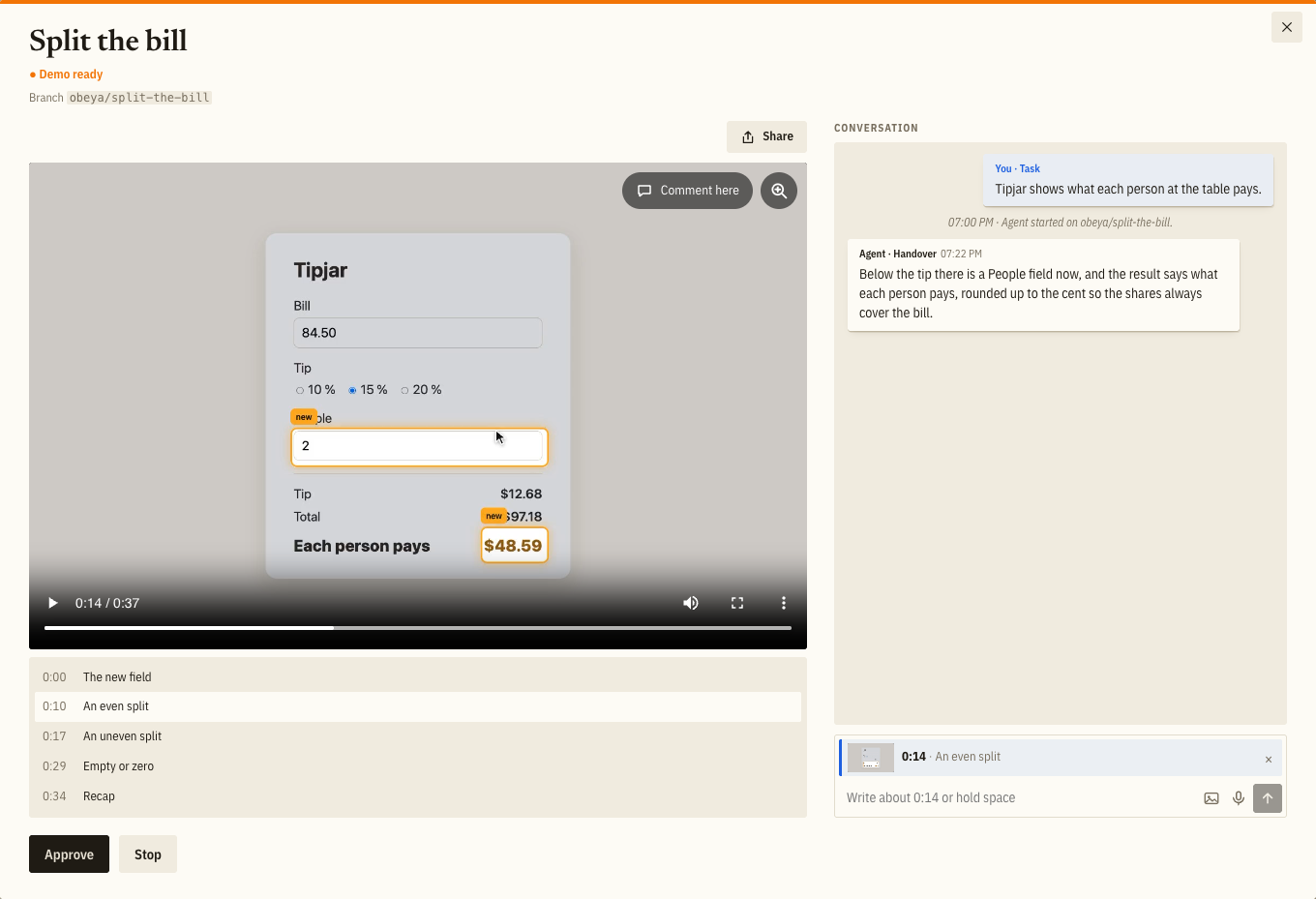
Lean back, as in a launch review. Every change comes back with a short report and something to look at: a narrated screen recording with chapters, or a page when the result is a layout or variants side by side. No clicking through the app to see whether it works. Approve it or say what to change. Obeya lands the work on main.

A card unfolded with the demo video of a tip calculator, its chapters and the approve button
Order

Parallel where it can, in order where it must.

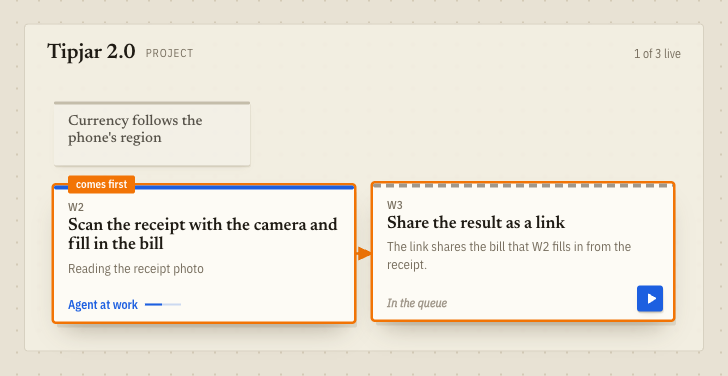
Start ten tasks or a whole project at once. Before a card starts, Obeya looks at what it will change and at what is already running. Independent work starts right away; a card that builds on another or would collide with it waits until that one has landed. Point at a card to see what it waits for.

A queued workstream waiting for the one it builds on, linked by an arrow

From idea to main

The usual way of a card: three steps, and the work in between is the agent's.

One card's way along the wall. A clear task goes straight to work; the detours are there when you need them.

  1. 1Say the task

    Export invoices as CSV
    “One row per invoice, VAT in its own column”
    Agent at work

    Hold the space bar and say what you want. It becomes a card, and an agent builds it in its own clone or worktree. You don't watch.

  2. 2Watch the demo

    !
    Export invoices as CSV
    Narrated demo, three chapters, a short report
    Demo ready

    The agent comes back with a demo of the finished work. You lean back and watch, instead of testing it yourself.

  3. 3Approve

    Export invoices as CSV
    Landed on main
    Approved

    Approve it with a click or a word. Obeya lands the branch on main or carries a pull request to the merge.

Not clear yet, or not quite right? show ideas, prototypes, another round and what an agent proposes on the way.

If it isn't clear yet
Idea
Invoices for the accountant
Which export would they actually use?
Idea

Start with an idea and talk it through with an agent: variants, trade-offs, what it would cost. It keeps a brief of what you decided.

Prototype
A download button
CSV from the invoice list
Agent at work
Prototype
A monthly e-mail
Agent at work

When talking is not enough, throwaway prototypes show the variants side by side. You build on the one that works.

A clear task starts here
Export invoices as CSV
Writing the export
Agent at work

A worker takes the card into its own clone or worktree and builds it. You don't watch.

!
Export invoices as CSV
One row per invoice, VAT in its own column
Demo ready
Changes? Another round

It comes back with a demo and a short report, or with a question. Say what to change, and it goes another round.

Export invoices as CSV
One row per invoice, VAT in its own column
Approved

You approve. Obeya lands the branch on main or carries a pull request to the merge. What the agent noticed on the way comes back as a proposal for a new card.

✦
✦ Proposal
Import invoices from CSV
Noticed while building the export
Proposed by an agent

The big room

Obeya is Japanese for the big room where a project lives on the walls. Nobody has to ask how things stand. You look.

One agent in one chat works well. Scale your work beyond a few, and you lose yourself in parallel chats that know nothing of each other: which one is waiting for you, which one is stuck, which one is touching what another built. Obeya puts every agent's work on one wall instead, and you stand in front of it.

Obeya is built with Obeya.

This page was a card there too.

Get started

Obeya is an app for macOS, Windows and Linux and runs locally. The agents use the official Claude Code installation on your machine, with your own subscription.

Download

On its first start Obeya checks for Claude Code, git and gh, installs what it can and opens your first canvas. The Windows installer is not signed yet: when SmartScreen warns, choose “More info”, then “Run anyway”.

From source

# needs Bun, Claude Code (logged in), git and gh
git clone https://github.com/sadilek/obeya && cd obeya
# the same setup, then your first canvas
bun install && bun start

The wall opens on http://127.0.0.1:4417, through the link Obeya prints, which signs your browser in. The app and the source share their data in ~/.obeya.